Verify & day-2
Test each outcome from a second terminal before you depend on it.
What a login looks like
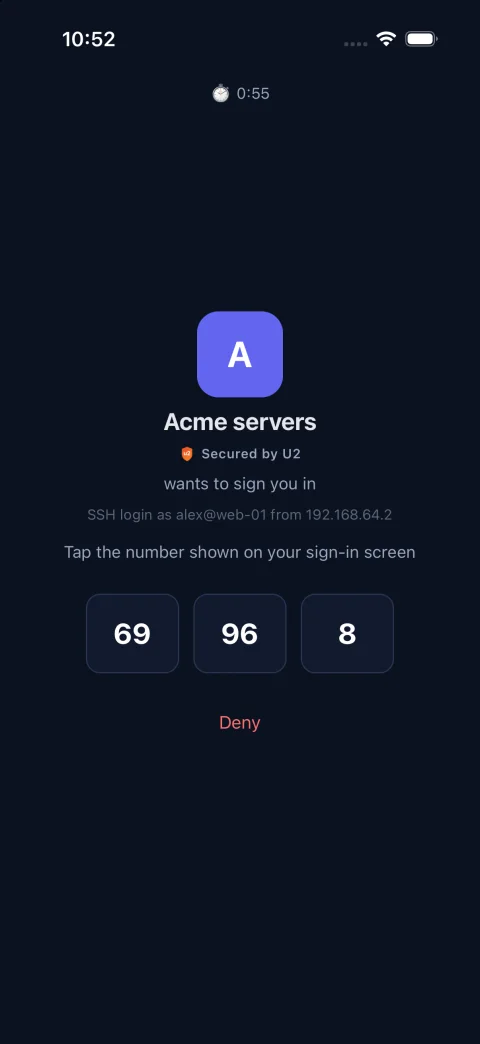
The terminal shows the number and a prompt; the phone shows three numbers and names the login, the source IP and the machine. Over SSH the user still presses Enter, before or after tapping: OpenSSH only shows the number together with a prompt. The same prompt takes a code from the app or a backup code instead.


Walk through every outcome
- 1ssh as an enrolled user → tap the number the terminal shows → Enter → the shell opens.
- 2Tap a wrong number, or Deny → “Permission denied”, the connection ends, and the phone does not ring again.
- 3sftp as the same user → the same prompt → it works.
- 4Block U2 Secured with a firewall rule → the prompt says it is unreachable → the app’s TOTP code gets in → a backup code gets in → the same backup code is refused. Remove the rule afterwards.
- 5Log in as the break-glass account → no prompt, straight through.
Decision log
The helper logs every decision to syslog (facility auth, tag u2auth), for example: user=bob rhost=1.2.3.4 service=sshd result=allow reason=code_accepted factor=totp. Alert on factor=totp, factor=backup and reason=disabled. A registered machine also sends the decisions it made by itself to the sign-in log; an unregistered one never does.
| reason | Meaning |
|---|---|
approved | Allowed: the user tapped the right number (factor=push). |
code_accepted | Allowed: a TOTP or backup code was accepted (factor=totp or backup). |
denied | Denied: a wrong number or Deny. Over SSH the connection ends with no second push; on a desktop it returns to the password prompt. |
expired | Denied: the push expired before an answer. |
timeout | Denied: no answer within prompt_timeout. |
bad_code | Denied: three codes were wrong. Over SSH the connection ends. |
unenrolled | Denied: the user has never paired a phone with this app. |
unenrolled_bypass | Allowed: never paired, but bypass_unenrolled is true. |
device_not_confirmed | Denied: paired, but pairing never finished, and the user has no offline code. |
risk_denied | Denied: the backend’s risk policy blocked the request. |
failclosed | Denied: U2 Secured unreachable, no offline code, failmode=secure. |
failopen | Allowed: U2 Secured unreachable, no offline code, failmode=safe. |
config_error | Denied: a rejected API key or other 4xx, and the user has no offline code. |
plan_limit | Denied: the U2 Secured plan’s monthly push quota is used up, and the user has no offline code. Watch the quota: when it runs out, every gated login falls back to codes. |
rate_limited | Denied: too many pushes from this machine in a short window, and the user has no offline code. With codes, the prompt says so and asks for one. |
bypass_user | Allowed: the login name is in bypass_users. |
disabled | Allowed: u2auth-admin disable is in effect on this machine. |
invalid_login | Denied: the login name isn’t a valid account name. Nothing is sent to U2 Secured. |
no_factors | Denied: a code was typed, but the user has no offline codes on this machine. |
conversation_failed | Denied: the client hung up, or couldn’t show the prompt. |
factor_store_error | Denied: the offline-code files couldn’t be read or written. Check state_dir. |
Day-2
- Lost phone: u2auth-admin reset bob --unpair (this removes the pairing for the whole fleet), then enroll bob again.
- Running out of backup codes: u2auth-admin backup-codes bob.
- U2 Secured or the PAM setup is broken and people must get in: u2auth-admin disable lets gated users in on their key alone, and logs every such login as reason=disabled. Run u2auth-admin enable afterwards.
- A user leaves: remove them from u2mfa and from the machines, then u2auth-admin reset bob --unpair.
- Re-running enroll for a user replaces their backup codes on that machine. Tell them first.
- Machine retired or compromised: revoke it under Machines in the portal (see Register & deregister machines).
- Queued sign-ins should go up now, for example after an outage: u2auth-admin sync.
Always keep a way back in
Whenever you change sshd or PAM, keep a second privileged session open until a fresh login works. bypass_users and the serial console are your last resort.